Christmas Tree Tracing
A big dotted Christmas tree to trace, plus reindeer, snowman, gingerbread man and 13 more festive pictures.
Christmas tree tracing is a free, browser-based tool for making printable Christmas tracing worksheets. It opens on a Christmas tree, a three-tier tree with a star on top and a trunk, and you can switch to other festive pictures such as a reindeer, snowman, gingerbread man or present. The tool runs in your web browser, needs no sign-up, and nothing you make is uploaded or sent to a server.
Each picture is printed as dotted lines for a child to trace over, so the page works as a Christmas tree tracer, a set of reindeer tracing pages or a full christmas tracing pack. You choose the paper size, layout, line style and whether a word to trace appears under the picture. You can print the sheet directly or download it as a PDF that prints at true size.
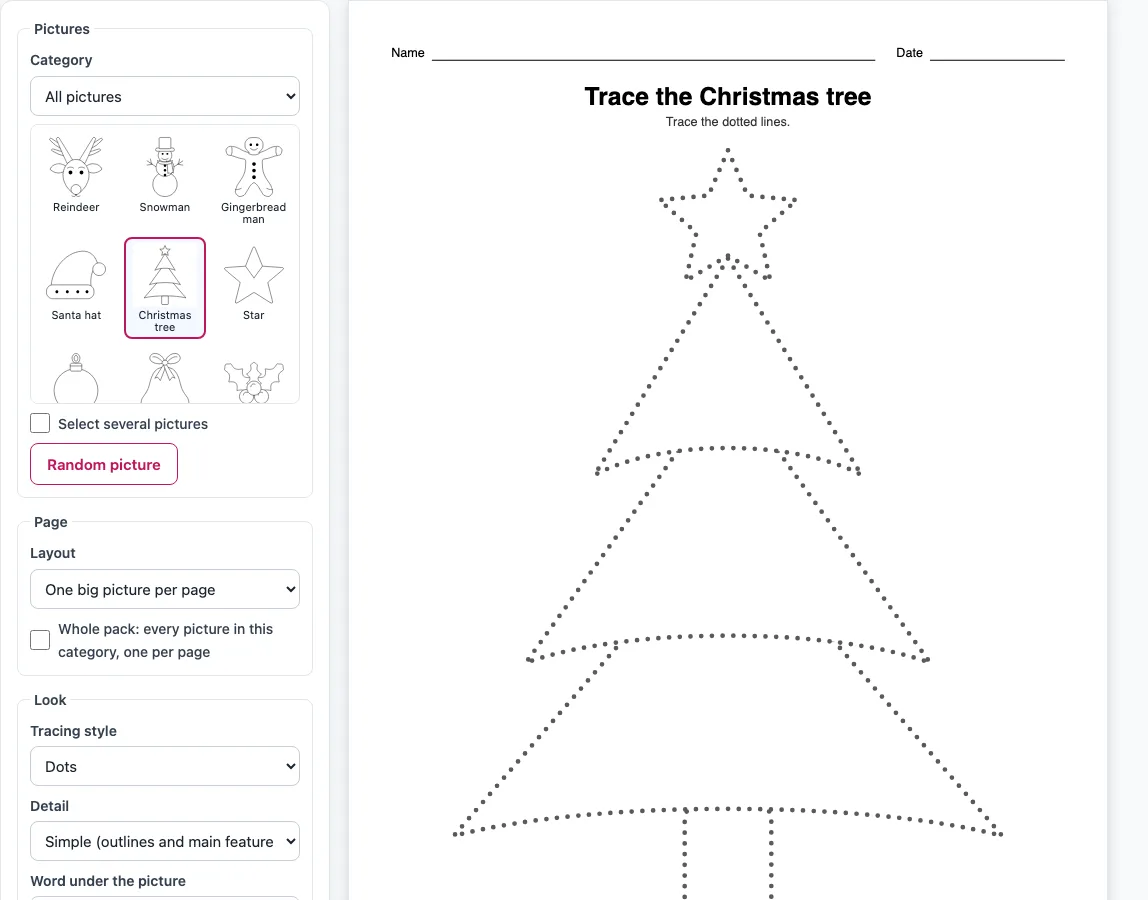
How to make a Christmas tracing sheet
- In the Pictures box, keep the Category on All pictures or narrow it to Characters, Decorations, or Gifts and treats.
- Click a thumbnail to pick a picture. To choose several, tick “Select several pictures” and click each one you want. To let the tool choose, click “Random picture”.
- Pick a Layout: “One big picture per page” (the default), “Two pictures per page”, “Four pictures per page”, “Trace it, then draw it yourself”, or “Draw the other half (symmetry)” for symmetric pictures.
- Set the Tracing style: Dots (the default), Dashes, Light grey line, or Solid black as a model.
- Set the Detail: Simple for ages 3 to 5, or Full for older children.
- Under “Word under the picture”, choose No word, Word to trace, or Word as a model. Tick “Thick lines” if you want bolder outlines.
- Choose the Paper size (US Letter or A4) and Orientation (Portrait or Landscape). The preview updates as soon as you change a setting.
- Edit the title if you like. Switch off the Name and date line if you do not want it.
- Click Print, Download PDF, or Copy link.
Print opens the browser’s print dialog with only the worksheet pages. Copy link gives you a link that reopens the same settings. To make a full set, tick “Whole pack” before you print or download. The “Small model picture in the corner” option works with the One layout and the pack only.
Which Christmas pictures can I trace?
The tool has 17 Christmas pictures in three categories. Characters include the reindeer, snowman, gingerbread man and Santa hat. Decorations include the Christmas tree, Christmas star, ornament, bell, holly, wreath, Christmas light bulb, bow and snowflake. Gifts and treats include the present, stocking, candy cane and mitten.
Every picture is drawn by the tool’s own code as friendly, rounded cartoon outlines. There is no copied clip art and no cartoon characters or brands. The rounded shapes keep the lines simple, which helps young children follow them with a pencil.
Eyes, noses and buttons stay as small solid dots, so faces remain easy to read on a traced page. Dot size and spacing grow with the printed size of the picture. A big one-per-page sheet therefore has larger dots than a four-per-page sheet, and the dots stay evenly spaced enough to trace. Hidden parts of a picture never show through, so the dotted lines show only the outlines a child should follow.
Can children color the pages after tracing?
Yes. After tracing, the white areas of each picture can be colored in. The page is black-and-grey line art, which keeps the file cheap to print on a home or school printer and leaves plenty of clean space inside each outline.
Tracing and coloring work well together. A child first follows the dotted outline to build pencil control, then fills the shape with crayons or colored pencils. Because the outlines are simple, the coloring step stays easy for young children too.
A traced and colored Christmas tree, star or bell also makes a quick handmade decoration or card front. Choose Two pictures per page for card-sized pictures, or the Thick lines option so the traced outline stays bold after coloring. The present and stocking can carry a child’s name written underneath.
The Christmas pictures are our own drawings, so the sheets are free to use at home, in class or in products you sell, such as Etsy printables.
Frequently asked questions
Is it free?
Yes. The tool is free, needs no sign-up, and nothing you make is uploaded to a server.
Can I make a Christmas tracing book?
Yes. Tick “Whole pack: every picture in this category, one per page” to get a cover page with small thumbnails and names of every picture, followed by one picture per page. The Christmas tracing pack holds all 17 pictures, so you can use it as an advent-style activity with one picture a day.
Can I sell Christmas tracing sheets on Etsy or in a KDP book?
Yes. The pictures are our own drawings, and the sheets you make are royalty-free for personal, classroom and commercial use, including Etsy printables, Teachers Pay Teachers, KDP books and print-on-demand. No credit is required, and the only thing you may not do is copy the generator itself to run a competing service.
Can I write “Merry Christmas” on the sheet?
Not with this tool. “Word under the picture” only adds the picture’s name, such as “snowman”, as a word to trace. For text such as “Merry Christmas”, use the Dot dot font page.
How do I print only the worksheet pages?
Click Print. The browser’s print dialog opens with only the worksheet pages, so the tool’s controls do not appear on the printout.
Which Christmas picture is best for a young child?
Keep the Detail set to Simple, which leaves out tiny detail lines and suits ages 3 to 5. Start with a large, simple shape such as the Christmas tree or snowman, with Dots as the tracing style and “One big picture per page” as the layout.
Related tools
- Halloween tracing: Use the Pumpkin trace for autumn tracing practice with the same kind of dotted outlines.
- Animal tracing: Use the Animal tracing pages, such as the cat trace, when you want animal pictures instead of festive ones.
- Things to trace: Browse a wider range of everyday objects to trace.
- Trace and color worksheets: Use these when you want tracing and coloring sheets side by side.
- Dot dot font: Use this to create dotted text, such as “Merry Christmas”, for tracing.
- Tracing words worksheets: Use these for word-level writing practice after picture tracing.
- Cutting practice worksheets: Use these to build scissor skills with simple shapes.