Cut and Paste Worksheets
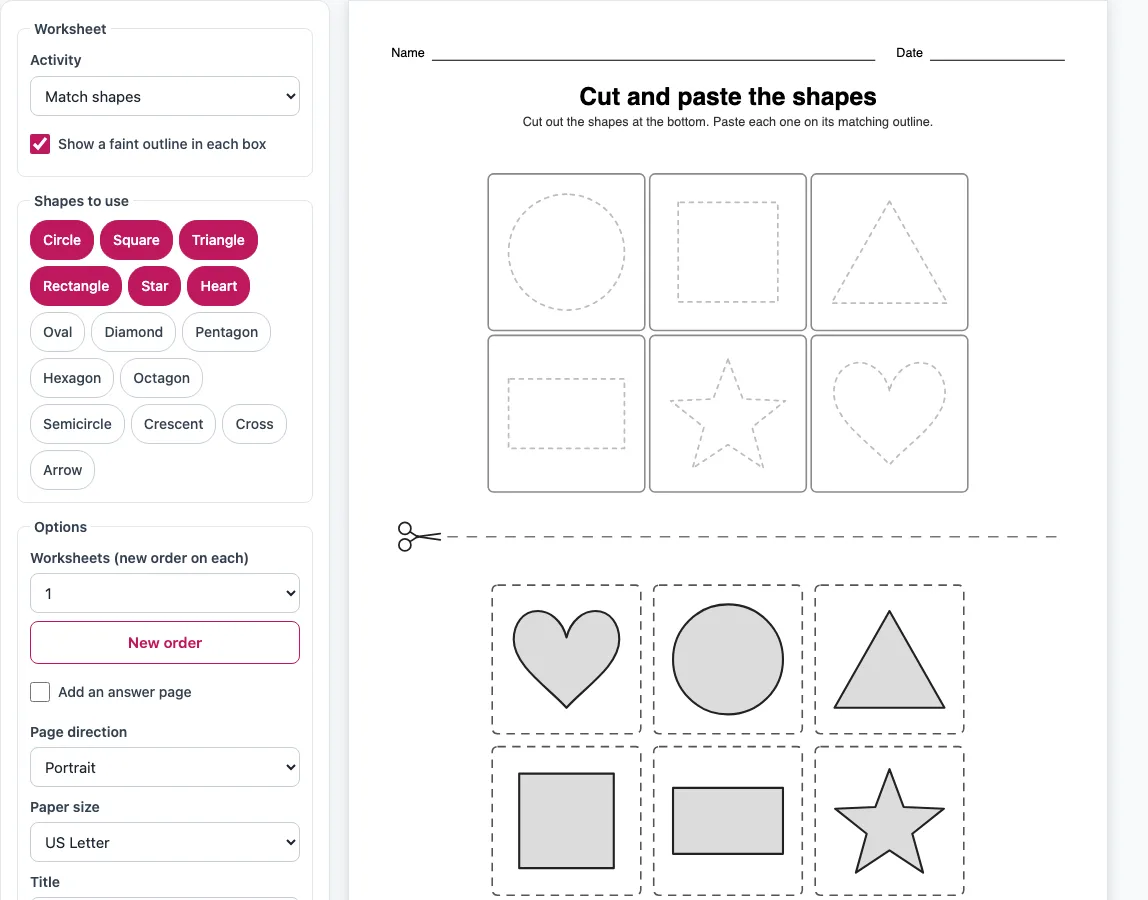
Pick an activity and get a page with empty boxes on top and pieces to cut out below. Print it or save it as a PDF.
Recent
Your last 10 settings, saved only in this browser. Nothing is uploaded.
How to use the cut and paste worksheets tool
- Choose an Activity: Match shapes, Put in order, Small to big or Finish the pattern. Each activity shows its own settings.
- For Match shapes, select at least two shapes from the shape buttons. Tick “Show a faint outline in each box” if the child needs a guide.
- For Put in order, choose what to put in order: Numbers, Letters (ABC order), Days of the week or Months of the year. For numbers and letters, pick How many (5, 10, 15 or 20) and Capital or Small letters. Untick “First box is already filled in” if every box should start empty.
- For Small to big, pick one Shape and a Number of sizes from 3 to 6. For Finish the pattern, select your shapes and choose a Pattern: AB, AAB or ABC.
- Set Worksheets to between 1 and 4 pages. Edit the Title, tick Name and Date line if you want it, and choose the Page direction and paper size.
- Check the preview. The boxes sit above the dashed line marked with a scissors icon, and the pieces sit below it.
- Click Print, Download PDF or Copy link.
Print opens the browser’s print dialog with only the worksheet pages. Download PDF builds a vector PDF that prints at true size. Copy link copies a link that reopens the same settings. Your paper size is remembered.
What are cut and paste worksheets?
A cut and paste worksheet is a printed page with empty boxes in the top half and loose pieces in the bottom half. The child cuts out each piece and pastes it into the box where it belongs. Depending on the activity, that means matching shapes, putting items in order or continuing a pattern.
The two halves are separated by a dashed cut line. Every piece is a little smaller than the box it goes into, so it fits inside it. In every activity the boxes stay in the top half and the pieces in the bottom half, so all the cutting happens below the dashed line. The boxes can hold outlined shapes, numbered slots or pattern rows, depending on the activity.
The four activities use the same idea with different rules. Match shapes asks the child to find each shape’s match. Put in order asks for numbers, letters, days or months in sequence. Small to big asks the child to compare one shape drawn in 3 to 6 sizes, from 34 percent to 100 percent of the largest size. Finish the pattern asks the child to continue an AB, AAB or ABC repeat.
The pieces are shuffled, so they are never printed in the answer order and the child has to work out where each one goes.
How do I make the pieces different each time?
Each worksheet page is shuffled separately, so the pieces are not arranged the same way on every page. When you set Worksheets to 2, 3 or 4, each page gets its own order. Press New order to reshuffle all the pages at once.
The shuffle uses a stored seed, and the link keeps that seed. The same link always gives the same worksheet. You can press New order until you have a set you like, then copy the link to come back to exactly that set later.
Frequently asked questions
What activities can I make?
You can make Match shapes, Put in order, Small to big and Finish the pattern. Each one has its own settings, so you can choose the activity that matches the skill you want to practise. A cut and paste shapes sheet and a cut and paste numbers sheet are both made with the same tool.
Is there an answer page?
Yes. Tick “Add an answer page” and the tool adds one extra page. It shows every worksheet’s boxes filled in with the right pieces, so one answer page covers all the worksheets you have made.
What do I need to print and use them?
You need a printer, plain paper, scissors, and glue or tape. The preview and PDF use black and grey line art, so they print cheaply on any printer.
Can I use the worksheets commercially?
Yes. The worksheets you make are royalty-free for personal, classroom and commercial use, including Etsy printables, Teachers Pay Teachers, KDP workbooks and print-on-demand. No credit is required, and the only thing you may not do is copy the generator itself to run a competing service.
Which age are these worksheets for?
The tool does not set an age or skill level for its sheets. You control the difficulty yourself by choosing how many shapes, numbers, letters or sizes to include. This makes it suitable for kindergarten and preschool cut and paste worksheets, as long as you pick settings that fit the child.
Related tools
- Cutting practice worksheets: use when a child needs more practice with scissors before cutting out pieces.
- Shape tracing worksheets: use to practise tracing shapes after matching them.
- Preschool tracing worksheets: use for tracing practice aimed at the preschool years.
- Tracing worksheets for kindergarten: use for tracing practice at the kindergarten level.
- Tracing lines worksheets: use for early pencil control with lines.
- Days of the week worksheets: use for more practice with the days after a Put in order sheet.
- Heart to trace: use when you want a heart shape to trace.