Days of the Week Worksheets
Trace Monday to Sunday in dotted letters, then write each day alone. Switch the list to make a months of the year sheet.
Recent
Your last 10 settings, saved only in this browser. Nothing is uploaded.
This free tool makes printable days of the week worksheets in your browser. Each day name is printed in dotted letters on handwriting lines so a child can trace it, then write it alone. You can also make months of the year worksheets or type your own word list.
Choose a sheet type, a row size and a tracing style, then print the sheets or download them as a PDF. The page works in three layouts: one row per word, a grid of word boxes, or three columns headed Trace, Copy and Write from memory. Everything runs in the browser, and nothing is uploaded.
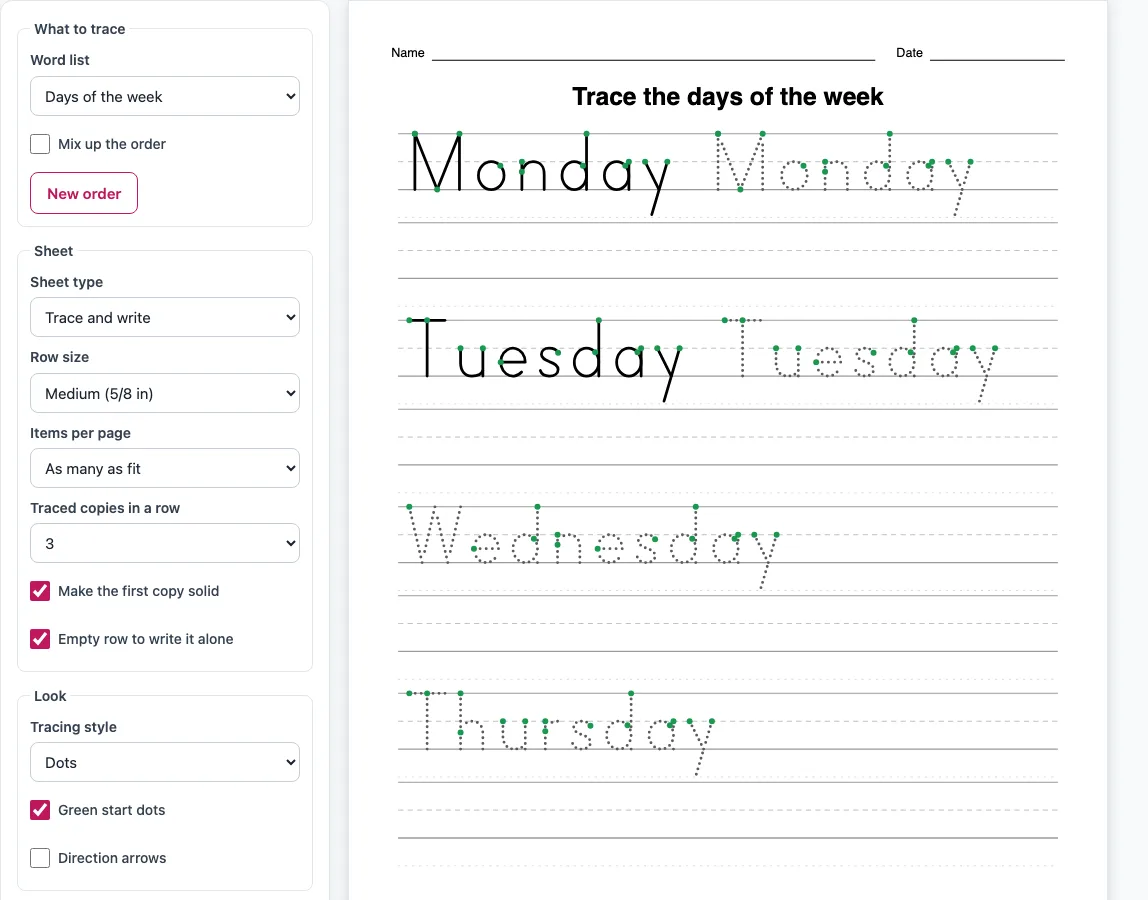
How to use the Days of the Week Worksheets Maker
- Open the Word list select. It starts on Days of the week (Monday to Sunday). To make months, choose Months of the year. To use your own words, choose My own words and type them, one word per line or separated by commas.
- Pick a sheet type: Trace and write, Word boxes, or Trace, copy, write.
- Choose a Row size: Extra large (1 in), Large (3/4 in), Medium (5/8 in), Small (1/2 in) or Extra small (3/8 in).
- For the Trace and write type, set Traced copies in a row from 1 to 4. Tick Make the first copy solid if you want a model to copy, and Empty row to write it alone if you want a blank line.
- Pick a Tracing style: Dots, Dashes, Grey or Solid black. Turn Green start dots and Direction arrows on or off.
- Set Items per page to As many as fit or to a fixed number.
- Leave Mix up the order off to keep the days in week order. Turn it on and press New order to reshuffle the list.
- Choose a paper size, US Letter or A4, then edit the Title and tick Name and date line if you need them.
- Press Print to open the print dialog with only the worksheet pages, or Download PDF for a vector file that prints at true size.
Copy link reopens the same settings, including a custom list, so you can save a set you have made.
How do I make days of the week worksheets?
Choose Days of the week in the Word list select, and the page fills the sheet with Monday to Sunday. Each name appears in dotted letters on lines, so the child traces the letters and then writes the word. The letters use the site’s own single-stroke print style, drawn with the stroke order and direction of American school print letters. Adjust the row size and tracing style to suit the child, then print or download.
How do I get days of the week in order?
Keep Mix up the order turned off, and the list stays Monday, Tuesday, Wednesday, Thursday, Friday, Saturday, Sunday. Turn it on only when you want a shuffled list for practice. If the goal is to put the days in order by cutting and pasting, use the Cut and paste worksheets page instead. Its “What to put in order” option includes Days of the week and Months of the year. This page is for tracing and writing the names.
What kinds of sheet can I print?
There are three sheet types. Trace and write gives one row per word, which suits practice with a single name at a time. Word boxes lays the words out in a grid of boxes. Trace, copy, write uses three columns headed Trace, Copy and Write from memory: the word is traced in the first column and the other two columns are empty handwriting lines. For Trace and write, the number of traced copies (1 to 4) and the row size change how much room each word takes.
Can I make a months of the year worksheet too?
Yes. Choose Months of the year in the Word list select, and the page prints January to December, with the title changed to “Trace the months of the year”. The same sheet types, row sizes and tracing styles apply. Months take more space than days, so at the default settings the 12 months fill 3 pages, while the 7 days fill 2 pages.
Frequently asked questions
Can I use the worksheets commercially?
Yes. The worksheets you make are royalty-free for personal, classroom and commercial use, including Etsy printables, Teachers Pay Teachers, KDP workbooks and print-on-demand. No credit is required, and the only thing you may not do is copy the generator itself to run a competing service.
Can I use the sheets in products I sell?
Yes. The sheets are free to use at home, in class or in products you sell, such as Etsy printables or KDP workbooks.
How many pages will my worksheet be?
For the Trace and write type at its default settings (Medium rows, 3 traced copies in a row, the first copy solid, and an empty row for each word) on US Letter or A4, the 7 days take 2 pages and the 12 months take 3 pages. Turning off Empty row to write it alone brings the days to 1 page and the months to 2 pages with Medium or Small rows.
What is the difference between Print and Download PDF?
Print opens your browser’s print dialog with only the worksheet pages. Download PDF builds a vector PDF that prints at true size, so it is useful when you want to save the file or print it later.
Is anything uploaded when I make a worksheet?
No. Everything runs in the browser, and nothing is uploaded.
Related tools
- Tracing words worksheets: use this when you want to trace words beyond the days and months.
- Cut and paste worksheets: use this to practise putting the days or months in order by cutting and pasting.
- Sight words tracing worksheets: use this for common words that children need to recognise quickly.
- Sentence tracing worksheets: use this when the child is ready to trace whole sentences.
- Dot dot font: use this to make dotted text for your own documents.
- Cursive tracing sheets: use this when the child is learning joined handwriting.
- Preschool tracing worksheets: use this for early tracing practice with younger children.
- Tracing worksheets for kindergarten: use this for tracing practice at kindergarten level.