Image Tracer
Choose a photo and get a clean outline to trace: print it as dots or lines, download an SVG, or trace it on your screen.
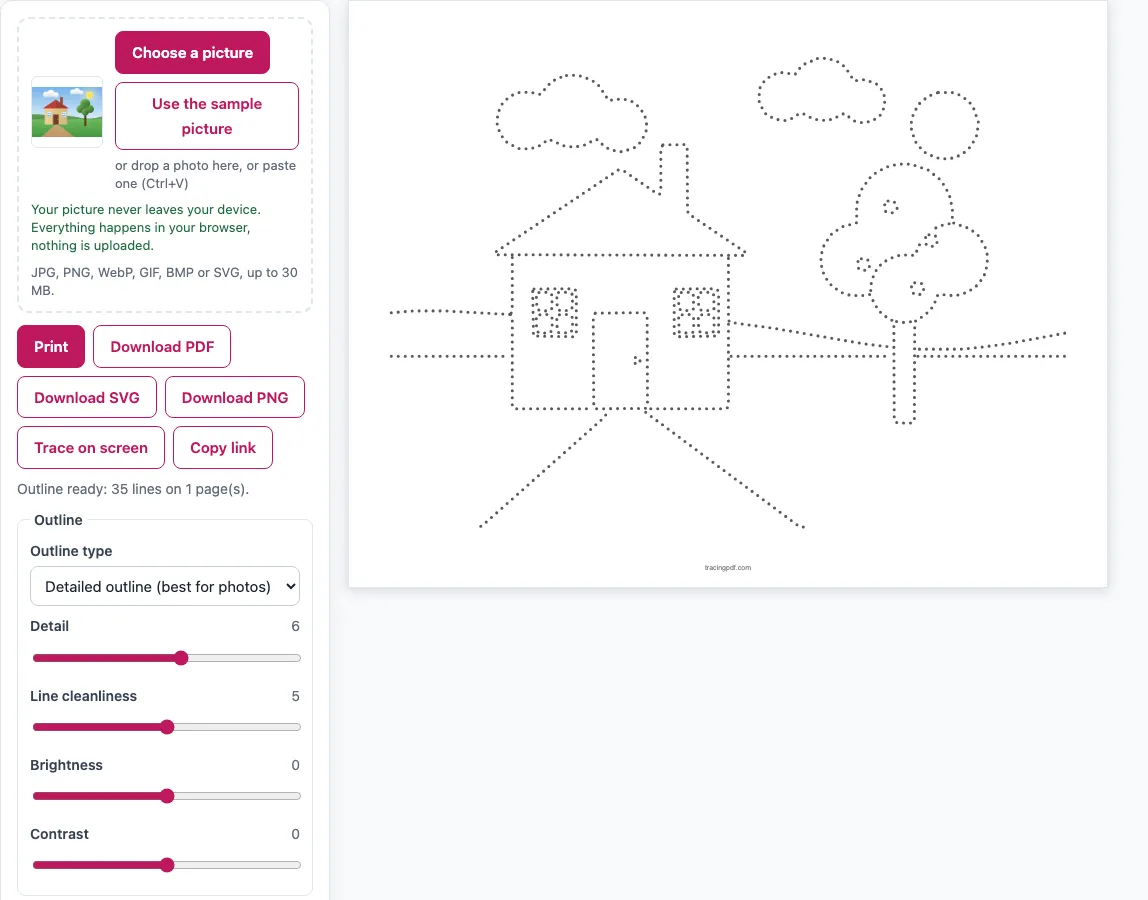
How to trace a picture with the image tracer
- Load your picture. Click Choose a picture, drop a photo on the box, or paste one with Ctrl+V. To try the tool first, click Use the sample picture to load a house drawing.
- Wait about half a second to one second while the outline is built.
- Pick an Outline type. Use Detailed outline for photos (the default), Simple outline for big shapes only, or Color regions for drawings and logos.
- Set Detail (default 6). Higher values add more lines. Raise Line cleanliness (default 5) to remove specks and short lines.
- Choose a Line style (Dots, Dashes, Light grey line or Solid black) and a Line weight (Thin, Medium or Thick).
- Set the page: US Letter or A4, Orientation, and a margin of 12, 15 or 20 mm. Add a title or a name and date line if you want.
- Click Print, or use Download PDF, Download SVG or Download PNG.
To trace on a screen instead, click Trace on screen. Choose Show: Outline or Original photo, then adjust brightness, opacity and size. Lock touch stops touches on the screen, so you can lay thin paper over a tablet or phone and trace through it. Turn the screen brightness up for a clearer view. Press Esc to exit.
The outline is free from our side to use at home, in class or in products you sell, as long as you have the right to the picture you upload.
How do I turn a photo into a tracing outline?
The tool looks for edges, which are the places where brightness or color changes sharply, such as the border of a face or the edge of a leaf. First it reduces the picture to about 1200 px. Then it finds the edges, thins them to one-pixel lines, and follows them into smooth vector lines. Very short lines are dropped.
Two settings control what you see. Detail decides how many edges become lines, so a higher value gives a busier outline. Line cleanliness removes small specks and short fragments. Brightness and Contrast (from -50 to 50) change the picture before edges are found, so a faint photo can be adjusted to show more of its edges. For a photo, start with Detailed outline and the default settings, then adjust Detail until the main shapes are clear without too much noise.
People look for this under many names: tracer image, tracer picture, tracing pic. The job is the same: you give it a picture, it gives you the lines. If you want to trace to draw, the printed dots or light grey lines let you trace the drawing first and then copy it freehand. If you came looking for a way to trace a picture the way Illustrator’s image trace does, the SVG download gives you the same kind of vector outline without installing anything.
What is the grid method for drawing?
The grid method is a classic way to copy a drawing by hand. You divide the picture into equal squares, then copy what is inside each square onto a matching square on your own paper, one square at a time.
Tick Grid method: grid over the picture plus an empty grid page. Page 1 shows the outline with a light grid. Its columns are lettered A, B, C and so on, and its rows are numbered. Page 2 is the same empty grid, headed “Copy it square by square.” Use Grid squares along the long side to set the count from 3 to 8 (default 5). Fewer squares give larger, simpler steps. More squares give more control but take longer. Work from one square to the next, and check that each line lines up with the squares around it.
Frequently asked questions
Is my photo uploaded?
No. The picture never leaves your device. The tracing runs in a background worker inside your web browser.
Can I get the outline as a vector SVG?
Yes. Download SVG saves the outline as clean black vector paths. You can open it in Illustrator or Inkscape, in cutting software, or on a laser cutter.
How do I trace a picture on my tablet or phone screen?
Click Trace on screen, then turn on Lock touch. Lay thin paper over the screen and trace through it. Turn the screen brightness up, and use the Flip and Rotate (90°) buttons if you need the picture a different way.
How do I make a big poster to trace on a wall?
Under the poster option, choose 2 x 2 pages or 3 x 3 pages. The outline is split over 4 or 9 pages, with 12 mm overlap, crop marks and a label on each page such as “Page 2 of 4 (row 1, column 2).” Print them and tape them together on the wall.
Why won’t my iPhone photo load?
HEIC files from iPhones are not supported. A message explains how to save the photo as a JPG, and then you can choose that file.
Can I sell the tracing outlines made from my pictures on Etsy or KDP?
From our side, yes. The outlines this tool makes are royalty-free for personal, classroom and commercial use, including Etsy printables, Teachers Pay Teachers, KDP books and print-on-demand, and no credit is required. The picture you upload is a different matter: use only images you own or have permission to use, because tracing someone else’s photo or artwork does not give you rights to it. The only other limit is copying the tool itself to run a competing service.
Related tools
- Things to trace: Find ideas for pictures and objects to practice tracing.
- Animal tracing: Use this when you want animal outlines, such as a cat trace, to print and follow.
- Trace and color worksheets: Choose this when you want a trace-then-color activity for children.
- Dot dot font: Use this to make letters made of dots for tracing practice.
- Shape tracing worksheets: Pick this for simple shapes that help with early pencil control.
- Tracing worksheet maker: Use this to build a custom tracing sheet from lines, shapes, words and sentences.