Color and Trace Worksheets
Trace the dotted picture, then color it in. Add a word to trace or a simple color key.
This free trace and color worksheet maker runs in your web browser and makes printable pages with a dotted picture to trace and an outline to color. You can make color and trace worksheets, trace and color worksheets, or a shapes trace and color worksheet without signing up. Choose a picture, adjust how it looks, and print it or download a PDF at true size.
Each sheet carries the instruction “Trace the dotted lines, then color the picture.” You can fit one, two or four pictures on a page, and the Shapes with faces category gives you circles, stars, hearts and other shapes to trace and color. Nothing you make is uploaded or sent to a server.
The pictures are our own drawings, so the sheets are free to use at home, in class or in products you sell, such as Etsy printables or KDP coloring books.
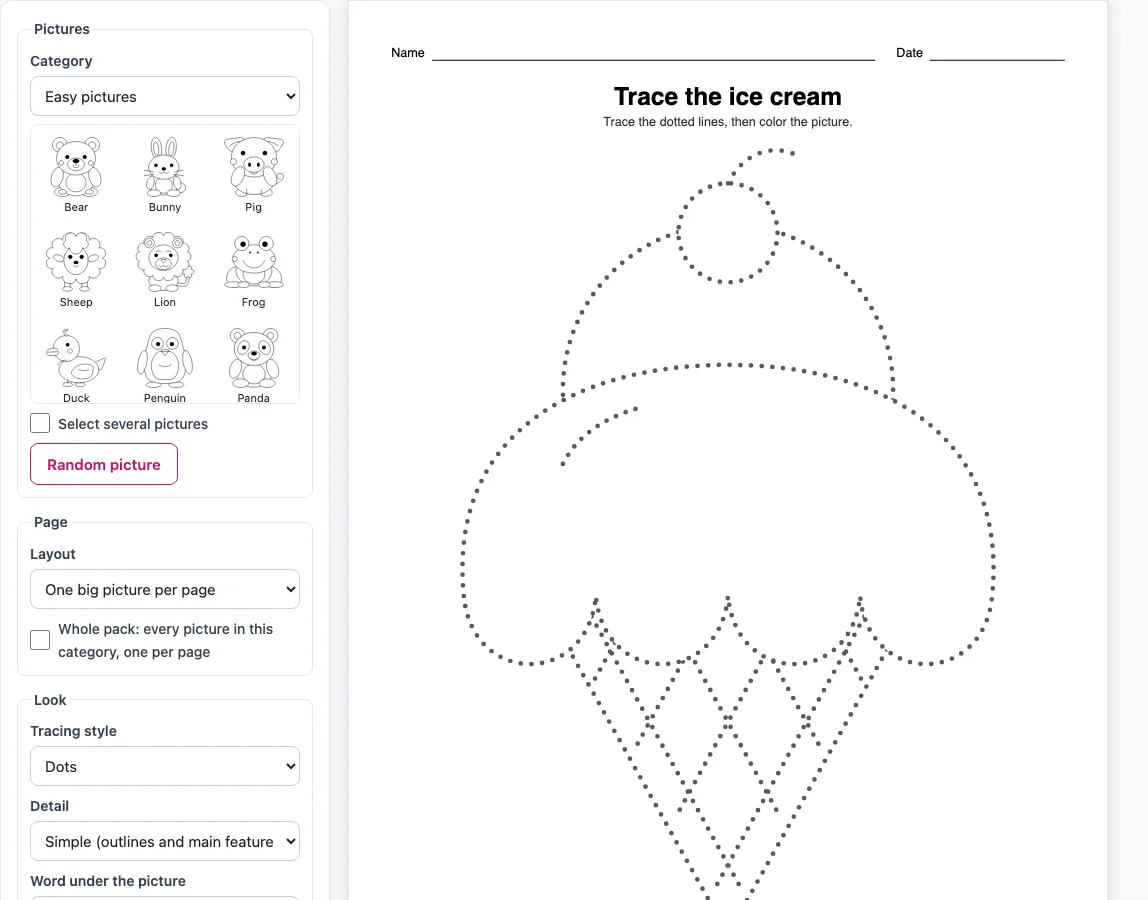
How to make trace and color worksheets
- Open the page. It starts on Easy pictures with the ice cream selected, so you can see a sheet straight away.
- Open the Category menu and choose Easy pictures, Animals, Food, Seasonal or Shapes with faces.
- Click a thumbnail to choose a picture. To choose several, tick “Select several pictures” and click each one. Or press “Random picture” to let the tool pick.
- Choose a layout: One big picture per page (the default), Two pictures per page, Four pictures per page, Trace it, then draw it yourself, or Draw the other half (symmetry) for symmetric pictures.
- Set the look. Pick a tracing style (Dots, Dashes, Light grey line or Solid black), a detail level, and a word under the picture. Tick Thick lines if you want heavier lines.
- Tick “Color key (numbered areas)” if you want numbered areas and a color line under the picture.
- Choose US Letter or A4 paper and Portrait or Landscape orientation. The preview updates as soon as you change a setting.
- Edit the title. You can also switch off the Name and date line.
- Click Print to open your browser’s print dialog with only the worksheet pages. Click Download PDF to save a file, or Copy link to keep the same settings.
For a full set, tick “Whole pack: every picture in this category, one per page.” The small model picture in the corner works with the One layout and packs.
What is a trace and color worksheet?
A trace and color worksheet is a printed page with a picture drawn in dotted lines for a child to trace with a pencil, then color in. Tracing builds pencil control; coloring adds a second fine motor task, staying inside a boundary, and makes the sheet feel finished. The tracing comes first, and the instruction on every sheet says so: “Trace the dotted lines, then color the picture.”
The order matters. A child who colors first covers the dots and loses the line to follow. Tracing first also gives the child a darker outline to color up to, so the coloring step is easier than on a plain dotted picture. These sheets suit roughly ages 3 to 6. For ages 3 to 5, keep the default Simple detail, which leaves out tiny detail lines. For older children, choose Full (every detail) so the picture includes all its small features, then add “Trace it, then draw it yourself”: the instruction becomes “Trace the picture, color it, then draw it yourself in the box.”
How does the color key work?
Tick “Color key (numbered areas)” and the largest areas of the picture get small numbers, with a line under the picture that names a color for each number, such as “1 = red 2 = blue 3 = yellow”. The colors are written as words, so the key still works on a black-and-white printer. They are suggestions only: the numbers go to the biggest areas, not to what each area is, so a child can happily make the ice cream green. Leave the key off for free coloring.
Can I make trace and color shapes?
Yes. Choose Shapes with faces in the Category menu to get a circle, square, triangle, rectangle, star, heart, oval, diamond, pentagon, hexagon and octagon, each with a small smiling face. A shapes trace and color worksheet can have one large shape per page, or two or four shapes on a sheet.
Frequently asked questions
Is it free?
Yes. It runs in your web browser with no sign-up, and nothing you make is uploaded or sent to a server.
Can I add the picture’s name for writing practice?
Yes. Under “Word under the picture”, choose “Word to trace” to print the name, such as “ice cream”, in dotted school print on a handwriting row, or “Word as a model” for solid print.
Will it print well on a black-and-white printer?
Yes. The pages are black and grey line art, and the color key names the colors in words, so nothing depends on a color printer.
Can I make a whole book of trace and color pages?
Yes. Tick “Whole pack: every picture in this category, one per page” to get a cover page with thumbnails and names, then one picture per page; the Easy pictures category alone gives about 75 pages. Tick “Shuffle the pack order” to mix them. The preview shows the first six pages, but Print and Download PDF include every page.
Can I sell trace and color sheets on Etsy or in a KDP book?
Yes. The pictures are our own drawings, and the sheets you make are royalty-free for personal, classroom and commercial use, including Etsy printables, Teachers Pay Teachers, KDP books and print-on-demand. No credit is required, and the only thing you may not do is copy the generator itself to run a competing service.
Related tools
- Animal tracing: use it when you want tracing sheets with animals, such as a cat trace.
- Things to trace: use it for everyday objects to trace along dotted lines.
- Shape tracing worksheets: use it when you want plain shape tracing without coloring.
- Christmas tree tracing: use it for a seasonal tree to trace in December.
- Pumpkin trace (Halloween tracing): use it for a pumpkin to trace in October.
- Preschool tracing pack: use it when you want a full set of tracing pages for young children.
- Cutting practice worksheets: use it when you want scissor practice alongside tracing.